On-Model Jeans Photography Without a Photoshoot: Fit, Drape, and What Goes Wrong
The Short Answer
Denim photography stands or falls on three things the image has to make unmistakable: the rise, the width of the leg opening, and where the hem breaks over the shoe. Hold those three and a generated image is usable on a product page. Miss one and the picture sells a different trouser than the one sitting in your warehouse.
What Makes Denim Harder Than It Looks
Jeans look like the simplest garment in the catalogue and behave like one of the hardest. Four reasons:
- The wash is a pattern, not a colour. Whiskering across the hip, honeycombs behind the knee, stacking at the ankle — these are position-dependent marks that only make sense on a body in a particular pose.
- Rigid and stretch denim fall completely differently. The same cut in 100 percent cotton and in a stretch blend produces two different silhouettes on the same person.
- The back carries the brand. Yoke angle, pocket placement, stitching, rivets and the patch label are what a returning customer recognises. All of it lives on the view most catalogues skip.
- "Jeans" is not a fit. Left unspecified, any generative system drifts toward the statistical average of its training data: a mid-blue straight five-pocket. Wide leg, barrel, bootcut and low rise have to be stated, not hoped for.
The Three Mistakes We See Most Often
1. Cropping above the hem
A waist-up shot answers none of the questions a denim buyer has. The hem is where the decision happens. This is partly a framing habit and partly a technical one: square compositions push an image pipeline toward waist-up crops, while portrait proportions keep the full leg in frame. If you take one rule from this page, take this one — jeans get photographed head to toe.
2. Leaving length and fit unstated
In GridShot, length and fit come from a cascade. Values your team curates for the article — the brand truth, entered by hand or mapped in from a shop import — override anything the analysis inferred, and are phrased in the prompt as non-negotiable. Where no curated value exists, the AI-detected value is used instead, in a softer preservation tone. Curated fields are opt-in and never filled automatically by the analysis, precisely because a confidently wrong fit instruction is worse than none. For denim, filling them in is the highest-leverage minute you will spend.
3. Working from packshots only
A flat lay or ghost mannequin shows the garment but not how it sits. One photograph of the same jeans on a body is the strongest fit signal available. GridShot recognises those worn perspectives as fit anchors, prioritises them among the references, and instructs the model to keep the length, drape and silhouette while ignoring the identity of the person wearing them. You do not need a professional image here; you need a truthful one.
The Views You Actually Need
| View | What it answers for denim | Typical slot |
|---|---|---|
| Full-length front | Rise, leg line, hem break over the shoe | Main image, catalogue view |
| Full-length back | Yoke, pocket shape and stitching, seat fit | Mandatory second view in practice |
| Side or three-quarter | Leg opening, how the leg falls in motion | Alternate |
| Waistband and fly detail | Rise, button versus zip fly, rivets, labels | Alternate |
| Fabric close-up | Wash, whiskering, weave, selvedge | Alternate |
How many of these are mandatory depends on where you sell. Zalando requires three compliant apparel images, five in the Premium and Designer segment; Amazon allows five to seven per listing and requires adult apparel to be shown on a model in the main image. The exact specifications, formats and rejection reasons are in the marketplace image requirements overview and in the detail pages for Zalando and Amazon. Marketplace-specific crops and export formats are a step you run after generation, not something a generated image satisfies by itself.
Three of Our Own Results, With Commentary
Every image below was generated with GridShot from product photography. We are showing them with their weaknesses, because a category page full of hero shots teaches nothing.
Studio front, straight leg
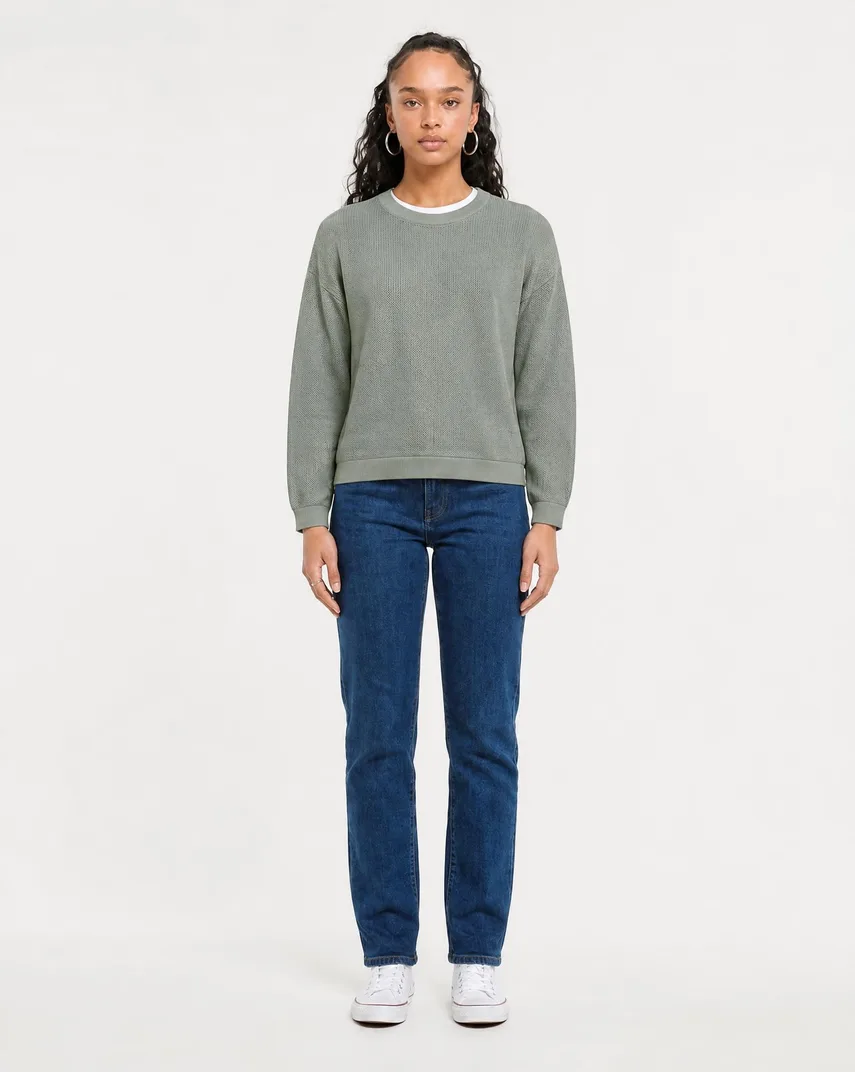
AI-generated with GridShot.
This is the version that belongs on a product page. The frame runs head to toe, so the hem break sits inside the image instead of being cropped away: the leg falls straight from the knee and stops just above the sneaker with a single soft break. Side seam and inseam are readable down the full length. What this image does not show is the back — the yoke and the pocket stitching are the part of a jeans that customers recognise, and no front view will ever carry them.
The same jeans in motion
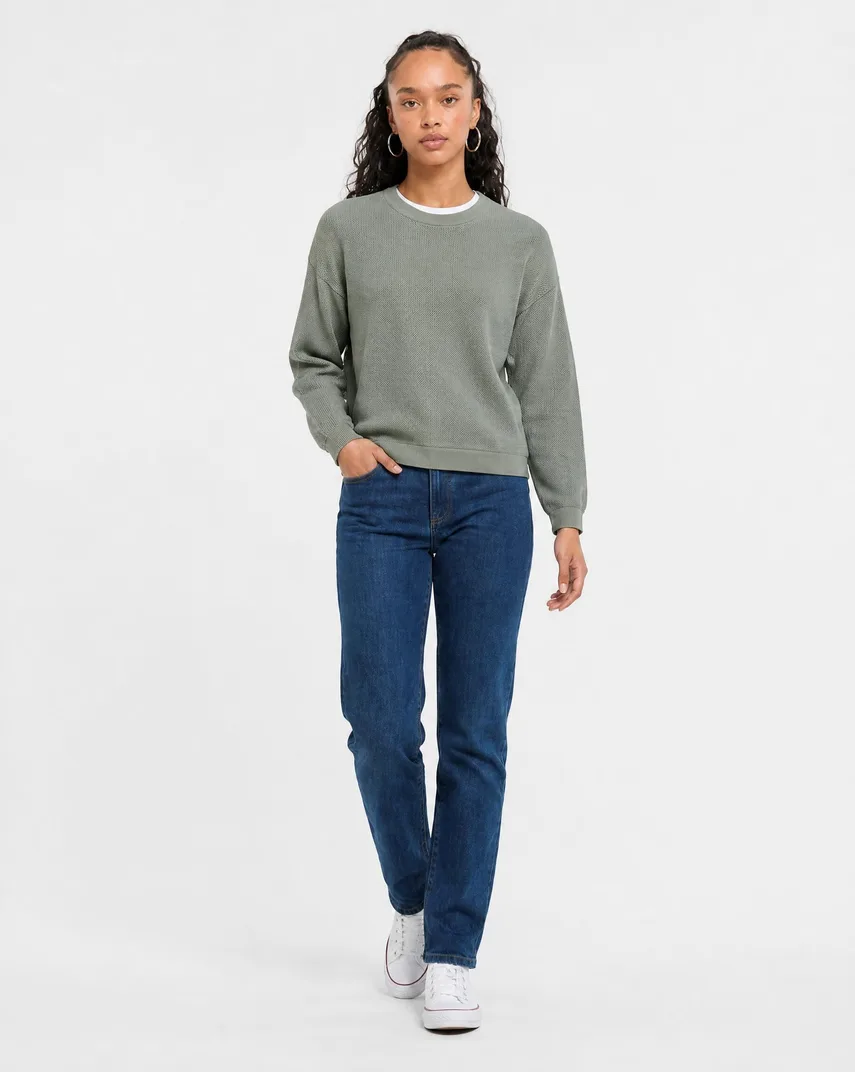
AI-generated with GridShot.
Same article, different pose, and the reason we show them next to each other: the walking shot proves the leg keeps its line in motion rather than collapsing, which is what a stretch blend would do differently. Note the honest cost of the pose. The hand in the pocket hides the front pocket opening, and the raised leg shortens the visible inseam. A motion shot supplements the static front view; it cannot replace it.
A different fit class: wide leg
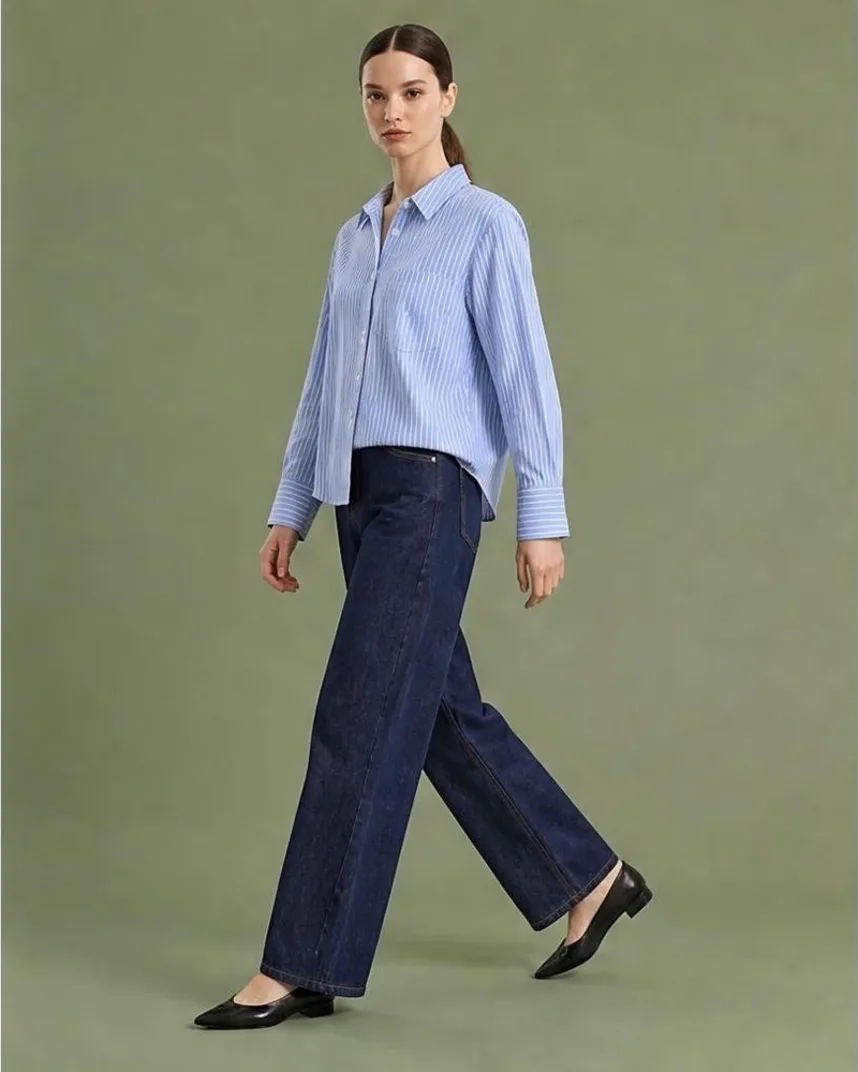
AI-generated with GridShot.
Wide leg is where unstated fit does the most damage, because the default the model reaches for is a straight leg. Here the volume holds from the hip down and the hem covers the instep of the leading shoe — a deliberate length that only reads at full height. Crop this at mid-thigh and it becomes indistinguishable from any other dark rinse. The coloured backdrop is a lifestyle choice, not a marketplace-compliant one; the white-background version is a separate run.
Where AI Denim Still Fails Today
The honest list, from our own output:
- Back artwork drifting to the front. Prints and embroidery that belong on the back can end up rendered on the front. On denim this hits back-pocket embroidery in particular. Every back view needs a human look before it ships.
- A stranger leaking in from a worn reference. If your fit reference shows the jeans on another person, traces of that person can carry into the output. The system is built to separate identity from fit, but the separation is not perfect — check faces and hands.
- Wash patterns are plausible, not identical. Whiskering and honeycombs land in the right regions with the right character, but they are not a reproduction of your specific laundry. For heavily treated denim, a real fabric close-up in the gallery is not optional.
- Small hardware gets lost. Rivets, jacron patches and stitched logos are a few pixels wide in a full-length frame. Treat them as a photography job or supply a dedicated close-up reference.
- A picture cannot prove a measurement. No generated image is evidence that a 32 inseam is a 32. Size charts do that work; the image only has to stop contradicting them.
- Reference budget is finite. A generation request carries a limited number of images, so references are prioritised — one primary per garment first, then worn fit anchors, then context images, then back, side and detail views. Uploading forty photos of one pair of jeans does not put forty into the request. Choose the five that carry information.
Related Category Guides
The same method, applied to categories with different failure modes: knitwear photography, where texture rather than length is the hard part, and shorts photography, where a few centimetres of inseam decide the purchase. Finished examples across categories are on the examples page, and the cost comparison against a booked shoot is in fashion photoshoot costs.
Frequently Asked Questions
How many images does a pair of jeans need on a product page?
Four carry real information: full-length front, full-length back, a side or three-quarter view, and one fabric close-up. A waistband detail is worth a fifth slot when the fly, rise or hardware is part of the story. Marketplace minimums are separate and stricter in format than in count, so plan the informative set first and cut to the format afterwards.
Can AI reproduce the exact wash and fading of a specific jeans?
Not identically. Whiskering, honeycombs and stacking are generated in the right places with the right character, but they are an interpretation of your reference rather than a copy of your laundry process. For a heavily treated denim, keep at least one photographed fabric close-up in the gallery and let the generated on-model views carry fit and styling instead.
What is the single most useful reference photo for denim?
One front view of the jeans worn on a body, however plainly shot. GridShot recognises worn perspectives as fit anchors and prioritises them, and the prompt then asks the model to keep length, drape and silhouette while ignoring who is wearing them. Rise and leg opening simply do not exist on a flat lay, which is why a packshot-only reference set produces the average fit.
Why do generated jeans so often come out as a straight mid-blue five-pocket?
Because that is the statistical centre of what the model has seen, and an unstated fit gets filled from the centre. The fix is to state it: curated length and fit values for the article override anything the analysis inferred and are phrased as binding instructions. Wide leg, barrel, bootcut and low rise all need this; a plain straight leg is the one case that survives silence.
What does an on-model denim image cost with GridShot?
One US dollar per published image plus the compute the run actually used, which lands at a few cents. A grid run takes 5 to 15 minutes and returns 16 to 25 pose variations, of which you publish only the ones you want. New accounts start with 10 US dollars of credit, and there is no subscription.
Ready to try it yourself?
Start with your own garment photos. Image generation is charged to your GridShot balance.
Create an account