Ghost Mannequin to On-Model: Turn Product Photos into AI Fashion Shots
From flat-lay to finished shot
One example from GridShot: two flat-lay product photos, reviewed variations, and a delivered model image.
1. Input
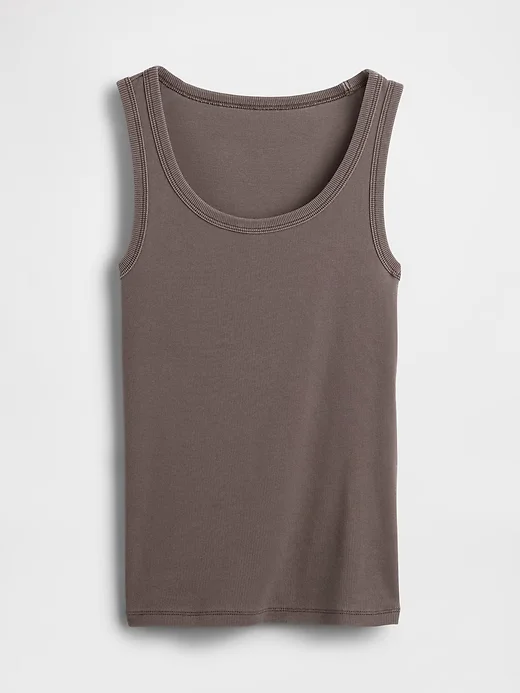
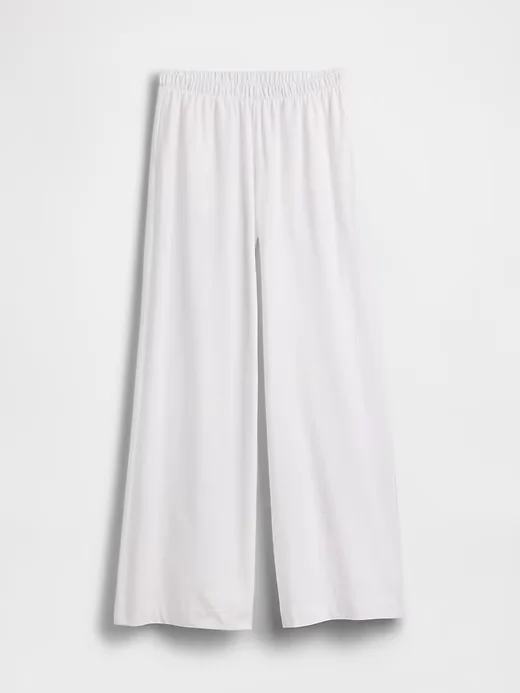
Upload the top and trousers as separate product photos, then choose a model.
2. Review and refine
Image generated with AI.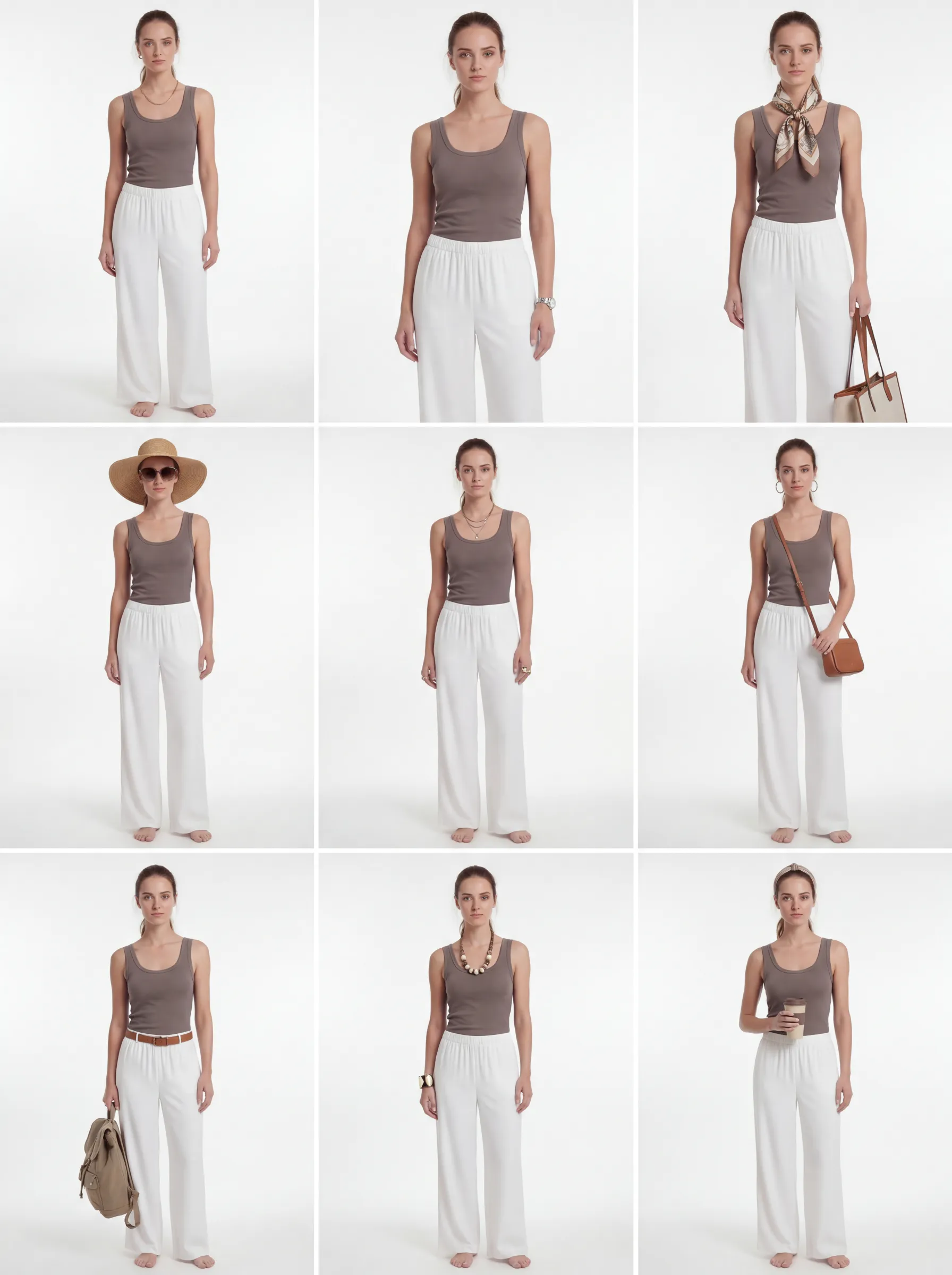
The refined grid explores styling variations. Compare each candidate with the original garments before selecting it.
3. Delivered
Image generated with AI.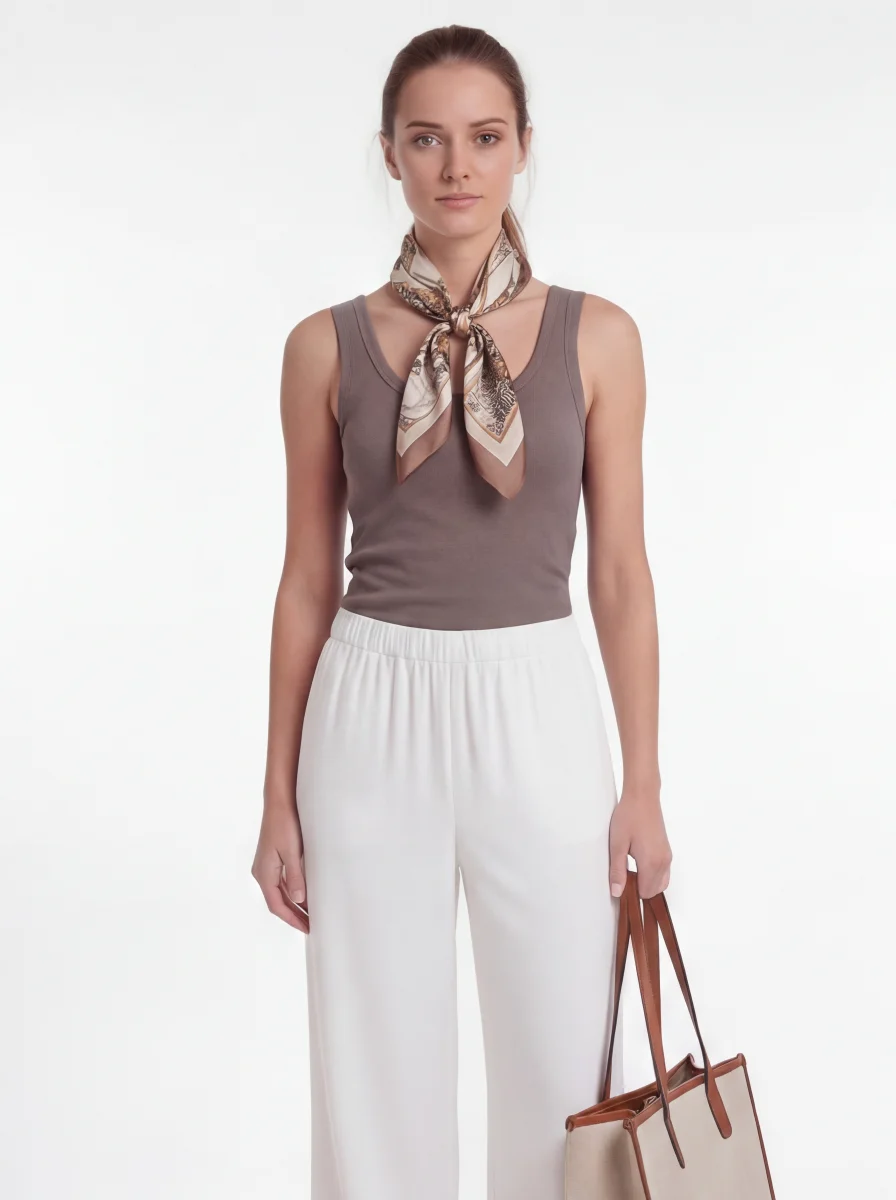
This selected result includes a scarf and bag added during styling. They are not part of the two source products. Check garment details before publishing.
See the first grid and what needed review
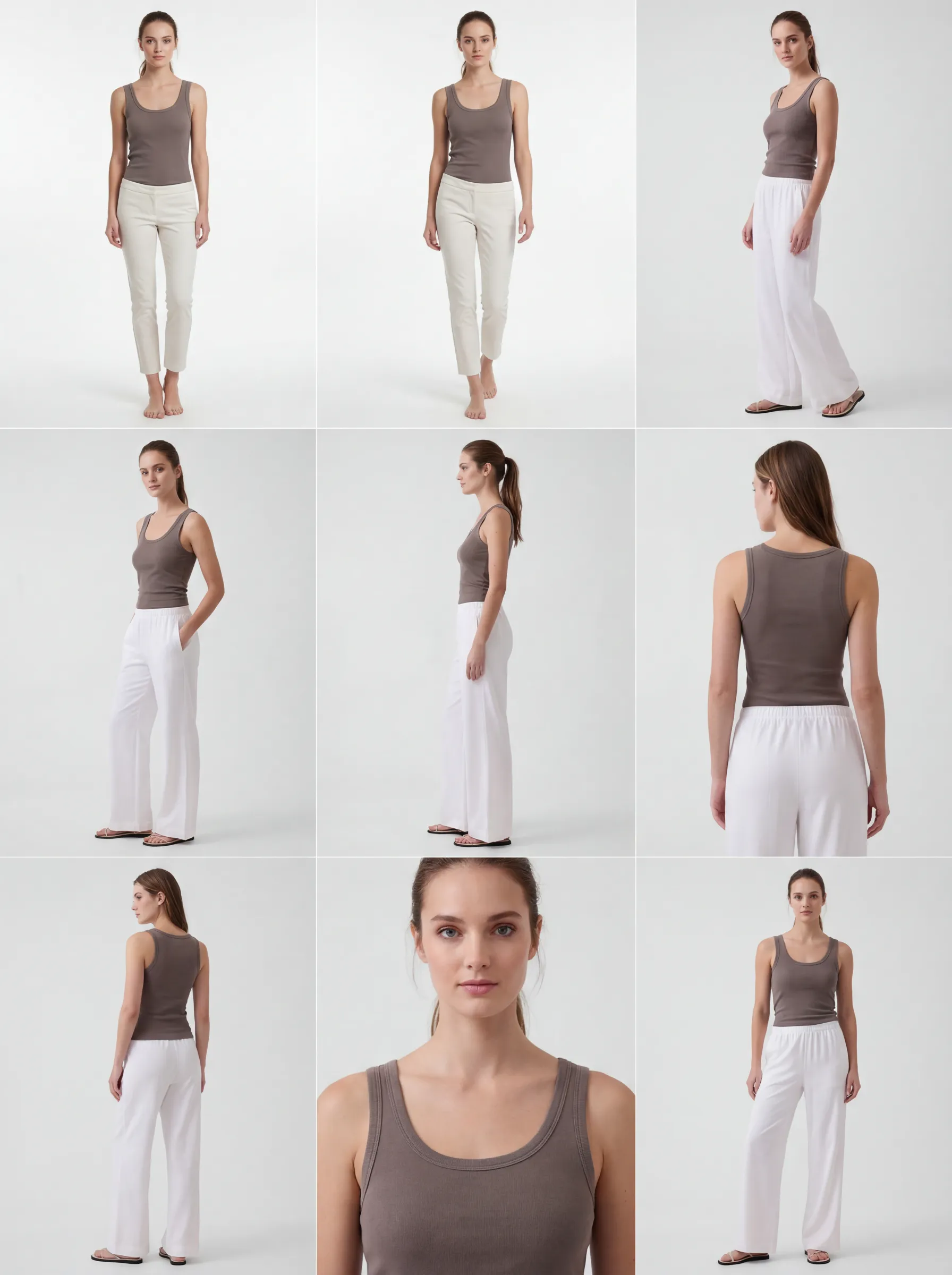 Image generated with AI.
The first two candidates show narrower, shorter trousers than the source photo. This is why selecting and reviewing images is part of the workflow. The refined grid above shows the subsequent styling variations.
What "Ghost Mannequin to On-Model" Actually Means
If you have ever shopped online, you have seen a ghost mannequin photo: a garment shot on an invisible form so the shape holds but no body is visible. Flat lay photos — clothing arranged and shot from above on a flat surface — and hanger shots are the other two workhorses of e-commerce product photography. All three are fast, cheap, and easy to produce at scale. None of them show how the garment actually looks and moves on a person.
"On-model" photography is the opposite: the same garment shown on a human body (or, increasingly, an AI-generated model), so shoppers can see fit, drape, proportion, and styling in context. Most fashion catalogs — especially those built from supplier or wholesaler assets — are full of ghost mannequin, flat lay, and hanger images and short on on-model coverage, simply because on-model photography has historically required a full photoshoot per product.
Why On-Model Photography Tends to Convert Better
Ghost mannequin and flat lay images are good at one thing: showing the product cleanly, without distraction. What they cannot do is answer the question every shopper is actually asking before they buy: "how will this look on me?" A garment photographed flat gives no sense of drape, no sense of how a hemline falls on a body, no sense of scale relative to a person, and no styling context.
On-model imagery closes that gap. It shows length, fit, and silhouette the way a person will actually experience them, and gives shoppers a styling reference instead of a flat abstraction. This is not a new idea — it is why traditional photoshoots have always paired ghost mannequin or flat lay shots with at least one on-model image per product. The difference is that, historically, only bestsellers got that treatment, because a full photoshoot for every SKU was never economically realistic. We go deeper on how photography quality connects to fit expectations and returns in our guide to reducing fashion return rates — worth reading if you want the fuller picture rather than a single number.
The honest caveat: on-model photography is one input among many (price, reviews, sizing charts, brand trust) that shape a purchase decision, and results vary by category and audience. What is consistent across fashion e-commerce is that a garment shown only as a flat lay or on a mannequin gives shoppers strictly less information than the same garment shown on a body — and less information usually means more hesitation, not less.
The Traditional Fix: Reshoot Everything On-Model
The obvious way to add on-model coverage is to book a photographer, hire a model, rent a studio, and reshoot. A typical fashion photoshoot for 20 to 30 looks costs $10,000 to $50,000 once you add up photographer, model, styling, studio, and retouching — and that is before the 2 to 6 weeks of lead time. For a catalog with hundreds or thousands of SKUs sourced as ghost mannequin or flat lay images from suppliers, reshooting everything on-model simply is not realistic. Most brands end up doing what they can afford: on-model shots for the top 20% of products, and flat lay or ghost mannequin for the rest.
How GridShot Turns Your Existing Product Photos into On-Model Images
GridShot skips the reshoot. You do not need a physical garment, a photographer, or a model booking — you need the product photo you already have. Ghost mannequin, flat lay, or hanger shots all work as input.
Here is what happens after you upload one:
- Garment analysis: GridShot analyzes the product photo for color, material, silhouette, and distinctive details (prints, stitching, hardware) — and where exactly they sit on the garment.
- Model selection: Choose a saved AI model or create one with 70+ configurable properties (body type, skin tone, hair, facial features, pose style). Models persist, so the same virtual model can wear your entire catalog.
- Virtual try-on generation: GridShot uses your product photo as the garment reference for the model image. Results can drift, as the first grid in the example shows. Tops, bottoms, and layered outfits (like a jacket over a t-shirt) can be combined, and the same look can be generated across multiple models in one batch.
- Fit accuracy safeguards: This is the part that matters most once you skip a physical fitting. GridShot's fit-accuracy system is built to preserve the garment's real length, drape, and silhouette across every generated pose rather than just approximating them. If your original photo already shows the garment worn on a body (a "worn" reference shot), that image can be used as a direct fit reference so the AI matches the real drape instead of guessing. Where you maintain your own fit data — for example a length or fit spec from your product catalog — that brand-provided information takes priority over the AI's own estimate.
- Delivery: Once you have a panel you like, GridShot's "Deliver This Shot" flow redraws the final image using the original product and model references. Need one small change instead? See annotation editing below.
Three Steps from Product Photo to Model Image
- Prepare products and a model. Upload ghost mannequin, flat-lay, or hanger photos and choose a model. Add any fit specifications or worn reference photos you have.
- Generate and review variations. Generate poses, then compare the cut, hem, colour, and details with the product photos. Reject or refine candidates that drift — the first grid in the example above changes the trousers.
- Deliver the selected image. Generate the final image and check it again before use. Styling accessories should not be mistaken for items included with the product being sold.
The product-photo-to-model tutorial walks through this example.
Fixing Details Without a Reshoot
Sometimes an otherwise-good on-model image needs one small change — a sleeve pushed up, a slightly different pose, a background tweak. Instead of regenerating from scratch or booking a reshoot, GridShot's annotation editing lets you mark the exact area on the photo, describe the change in plain language, and get an updated photo back in about a minute.
Batch Processing: Your Whole Catalog, Not Just Bestsellers
Because there is no physical shoot involved, the same workflow scales across a catalog: the same garment across multiple models (different body types, skin tones, or styling), or many garments across the same model for a consistent lookbook. This is the part traditional reshoots could never afford — professional on-model coverage for every SKU, not only the top sellers.
Who This Is For
- D2C brands on Shopify whose supplier or manufacturer only provides ghost mannequin, flat lay, or hanger photos, and who need on-model imagery for their storefront without commissioning a shoot per drop.
- Enterprise retailers with large, multi-brand catalogs built from vendor-supplied flat lay or hanger images, who need consistent on-model coverage across thousands of SKUs.
- Marketplace sellers receiving flat lay or ghost mannequin assets from multiple brands and needing a fast, consistent way to add on-model images to every listing.
GridShot connects to Shopify and WooCommerce for catalog sync, and supports CSV import for bulk workflows — so ghost mannequin and flat lay images already in your product catalog can be queued for on-model generation directly.
Frequently Asked Questions
What's the difference between a ghost mannequin photo and an on-model photo?
A ghost mannequin photo shows a garment on an invisible form so the shape holds without a visible body — fast and clean, but with no fit or drape information. An on-model photo shows the same garment worn on a body (real or AI-generated), so shoppers can see length, drape, silhouette, and styling in context.
Do I need to reshoot my products to get on-model photos?
No. GridShot works directly from the product photos you already have — ghost mannequin, flat lay, or hanger shots all work as input. There is no need for a physical garment, a photographer, or a model booking.
Will the AI get the fit right, or does it just put my garment on a generic body?
GridShot's virtual try-on places the actual garment from your photo onto the model, and its fit-accuracy system is built to preserve the real length, drape, and silhouette across every generated pose rather than approximating them. If you provide a worn reference photo or your own fit and length specifications, those take priority as the source of truth.
Can GridShot handle layered outfits, like a jacket over a t-shirt?
Yes. Tops, bottoms, and layered pieces can be combined onto the same model in one generation.
Can I generate the same product across multiple AI models at once?
Yes. Batch generation applies the same garment to multiple saved models in one run — useful for showing body-type or styling diversity without booking separate individual shoots.
How much does an on-model image cost, and can I fix small details afterward?
GridShot charges $1 per finished, published image plus the underlying AI compute cost, with no subscription required — new accounts start with $10 in credit. If a generated image needs a small fix, annotation editing lets you mark the area, describe the change in plain language, and get an updated photo back in about a minute, without a full reshoot or regeneration.
What It Costs
GridShot is pay-per-image: $1 per finished, published image, plus the underlying AI compute cost — no subscription. New accounts start with $10 in credit. See pricing for details, or book a demo to walk through your specific catalog.
Ready to try it yourself?
Start with your own garment photos. Image generation is charged to your GridShot balance.
Create an account