Scale Product Photography: A Workflow for Large Fashion Catalogues
A pilot workflow for a large product range
Start with a small product group and run it from source photo to approved export before expanding. Use the same shot list, model, framing rules and reviewer for that batch. Count approved images and review time so you can plan the rest of the catalogue from your own results.
- Choose representative garments: Include the cuts, materials and details that are difficult to preserve in your range.
- Define the required views: Record front, back, full-length and detail views by SKU. Use the free shot-list template as a planning sheet; it is separate from the product-import format.
- Produce and review the pilot: Compare each selected image with its product photos and record corrections, attempts and selection time.
- Check the delivery: Use the product image checker for technical marketplace requirements, then review image content and channel-specific rules separately.
- Expand by product group: Use the pilot results to plan capacity. The CSV product import supports bringing a larger catalogue into the workflow.
Watch the product-photo-to-model demo or inspect the actual outfit example and its corrections before starting your pilot.
How Do You Scale Product Photography?
Product photography scales once every image stops being its own appointment. Three routes work in practice: standardised batch shooting, outsourcing to a provider with a fixed process, and generating images from product photos you already have. The cheapest route is rarely the fastest, and what decides between them is which bottleneck hits your catalogue first — sample logistics, retouching, or approvals.
The rest of this article answers the question concretely: where scaling actually breaks, what the three routes cost, what consistency across 500 articles means technically, and which route carries at which catalogue depth.
Where Scaling Really Breaks — and Where It Does Not
Most scaling discussions revolve around the photographer. The photographer is rarely the problem. Anyone trying to produce images for 500 articles hits three other bottlenecks first.
1. Sample logistics
Every garment to be photographed has to be physically on set — in the right size, pressed, with its labels intact, and on the right day. Across 500 articles that means picking, shipping, returning and re-storing. Articles still in production or in transit slide into a follow-up session. This item grows strictly linearly with the number of articles, and no faster photographer shortens it.
2. The retouching queue
A shoot day produces more raw material in a few hours than image editing clears in a week. That is why the shoot day is almost never the critical path: the bottleneck sits behind the camera. Double your shooting capacity without scaling retouching alongside it and you have simply lengthened the queue, at the same lead time and twice the cost.
3. Approvals
The most underestimated bottleneck. Every image eventually needs a "yes" from someone responsible for it. At 3,000 images that is no longer a side task but a job of its own with its own time requirement. And unlike the other two, this one does not disappear when images are generated rather than photographed — it just moves forward.
Before choosing a route, work out which of the three hits you first. A scaling path that solves the wrong bottleneck costs money without effect.
Three Scaling Routes and Their Cost Logic
The three differ less in price than in how the price grows with the number of articles — which is the relevant property when scaling.
| Route | Cost logic | Carries up to | Where it breaks |
|---|---|---|---|
| Batch shooting in your own setup | Fixed cost per shoot day; the unit price falls the more articles pass through a day | A few hundred articles per season | Shoot days are finite, and every sample has to be physically present |
| Outsourcing to a studio or service provider | Price per image or per article, essentially linear | Any volume, as long as the budget grows with it | Costs grow proportionally; lead time stays measured in weeks |
| Generating from existing photos | Publication fees plus the actual compute and refinement used | Thousands of images without the unit price rising | Needs usable source material; selection and approval stay manual |
Route 1: Standardise batch shooting
The fastest lever for anyone already shooting in-house. Batch shooting means grouping similar articles, setting up one lighting setup once and leaving it standing all day, writing the shot list in advance, and sequencing model changes by product group. The unit price falls because setup time is spread across more articles. The ceiling is hard: a day has a fixed number of hours, and every additional article needs a physical sample.
Route 2: Outsource with a fixed process
A specialised provider with a standardised workflow delivers predictable quality and takes the coordination off your desk. For the price frame, as a market observation rather than a survey: e-commerce images sit at roughly EUR 15 to 25 apiece, and the full breakdown by service type is in product photography pricing. The catch when scaling is the cost logic — it is linear. Twice the catalogue costs twice as much. This route makes scaling predictable, not cheaper.
Route 3: Generate instead of photograph
Here the cost curve changes, because the marginal cost profile is different. From an existing product photo — a flat lay, a ghost mannequin shot or an existing on-model image — the further views and poses are generated. In GridShot, model and scene choices can be reused while you generate and review pose grids. The cost depends on published images, generation attempts and refinement. Check current pricing and measure your pilot instead of treating a fixed runtime or number of attempts as guaranteed.
The precondition deserves to be stated plainly: without a usable source photo, nothing happens. This route does not replace the first shot of an article. It replaces every further view, pose and variant — and that is the part that blows up the bill at 500 articles.
What Consistency Across 500 Articles Means Technically
At 20 articles, inconsistency is barely noticeable. At 500 it becomes the visible quality of the category page: different crops, shifting skin tones, some articles full length and some from the hip up. Technically, consistency breaks down into four things that have to be steered separately:
- Model identity: the same person across the entire catalogue. If it changes between articles, the category page looks assembled from parts even when each individual image is good.
- Framing and crop: head-to-toe or waist-up is not an aesthetic whim but a rule that belongs fixed per product group. Floor-length dresses require full length — otherwise the image is missing exactly the information someone opened it for.
- Light and background: within one grid run all variations share the same lighting situation. Across several runs the specification has to be explicitly kept the same.
- Fit and length: the point most often underestimated. Whether an oversized hoodie stays oversized and a midi skirt ends mid-calf must not be left to chance. In GridShot a dedicated mechanism handles this: curated length and fit values maintained by the brand take precedence over the AI's inference, and worn reference shots act as visual fit anchors for length, drape and silhouette.
In practice this means setting the consistency rules at the start rather than adjusting at article 300. A catalogue produced half to rule A and half to rule B looks worse than one produced entirely to the second-best rule.
Capacity calculation: 500 articles, 6 approved images each
500 articles with six required views each mean 3,000 approved images. This is a planning example, not a completed customer project or a quote.
- Image volume: Agree which six views are needed for each product group. Six variations of the same angle do not provide six useful product views.
- Generation budget: Include current publication and operation charges, unsuccessful attempts, refinement and any upscaling. Record the costs in the pilot before extrapolating.
- Review capacity: Multiply the number of required images by the selection and checking time measured in your pilot. Add corrections and final delivery checks.
- Production time: Use observed throughput for complete, approved batches. A grid runtime alone does not measure when a catalogue is ready to publish.
- Import: Follow the CSV product-import guide and check the first imported group before bringing in the full catalogue.
Compare this total with a studio or service-provider quote covering the same views, retouching, usage rights and delivery checks. The ROI calculator can help explore assumptions; your own pilot supplies the operational evidence.
Decision Guide by Catalogue Depth
Which route carries depends less on the industry than on the number of articles and how quickly they turn over:
- Up to around 50 articles: a well-prepared shoot is often the simpler path. Coordination is manageable and the fixed costs spread across a volume that clears in one or two days.
- 50 to 300 articles: the zone where hybrid approaches win. Hero products and campaign imagery go to the studio, catalogue breadth and all additional views are generated. This is where the linear cost curve starts to hurt noticeably.
- 300 to 2,000 articles: the generated route becomes the base coverage and shooting becomes the exception for the top 10 to 15 percent. At this size, sample logistics alone is an argument that counts independently of the image budget.
- Over 2,000 articles or high turnover: for marketplace assortments and fast-changing ranges only an automated route carries. A shoot cycle measured in weeks is structurally too slow here, regardless of what it costs.
One special case cuts across that grouping: if the return rate is the real problem, what decides is not the number of images but which views are missing. More on that in reducing fashion return rates.
Frequently Asked Questions
Where does product photography break first when you scale it?
Rarely at the photographer. Sample logistics go first, because every garment has to be physically on set; then the retouching queue, because one shoot day produces more raw material than post-production clears in a week; then approvals, which become a job of their own at thousands of images. Fix the actual bottleneck before booking more shoot days.
How do you keep 500 SKUs looking consistent?
Four things have to be steered separately: the same model identity across the catalogue, fixed framing rules per product group, unchanging light and background, and deliberate control of fit and length. In GridShot, curated length and fit values — set manually per product — take precedence over the guess from image analysis, and worn reference shots serve as visual fit anchors.
Do marketplace and social formats come out of the same production run?
Not automatically. Master images are produced once; each channel then needs its own crop and export step, because aspect ratios, background rules and minimum dimensions differ. Vertical social framing in particular is usually a reframe rather than a crop — a composition that works at 3:4 loses the shoes at 9:16.
Should we build photography in-house or outsource it?
Answer that from the bottleneck rather than the day rate. If the queue is sample handling and approvals, an in-house setup mostly relocates the problem. If it is shoot capacity for a steady stream of new articles, in-house starts to pay. The middle path many shops land on: generate the catalogue layer, book a studio only for hero products.
What is the smallest useful step toward full catalogue coverage?
Audit which SKUs lack an on-model view, take one product group that has a decent source photo, and produce that layer end to end — including selection, sign-off and the upload back to the shop. A single group run through the whole pipeline tells you more about throughput than a broad test that never reaches the storefront.
From flat-lay to finished shot
One example from GridShot: two flat-lay product photos, reviewed variations, and a delivered model image.
1. Input
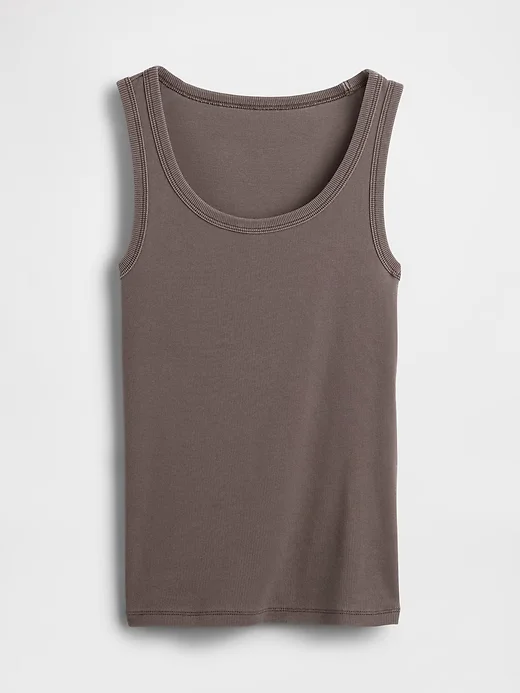
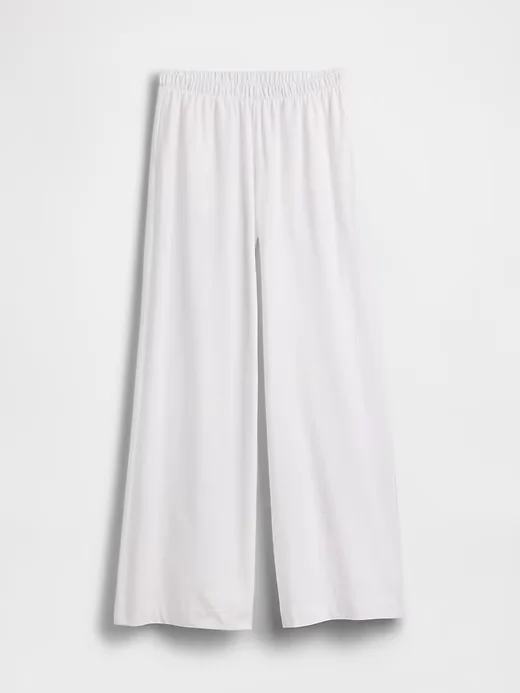
Upload the top and trousers as separate product photos, then choose a model.
2. Review and refine
Image generated with AI.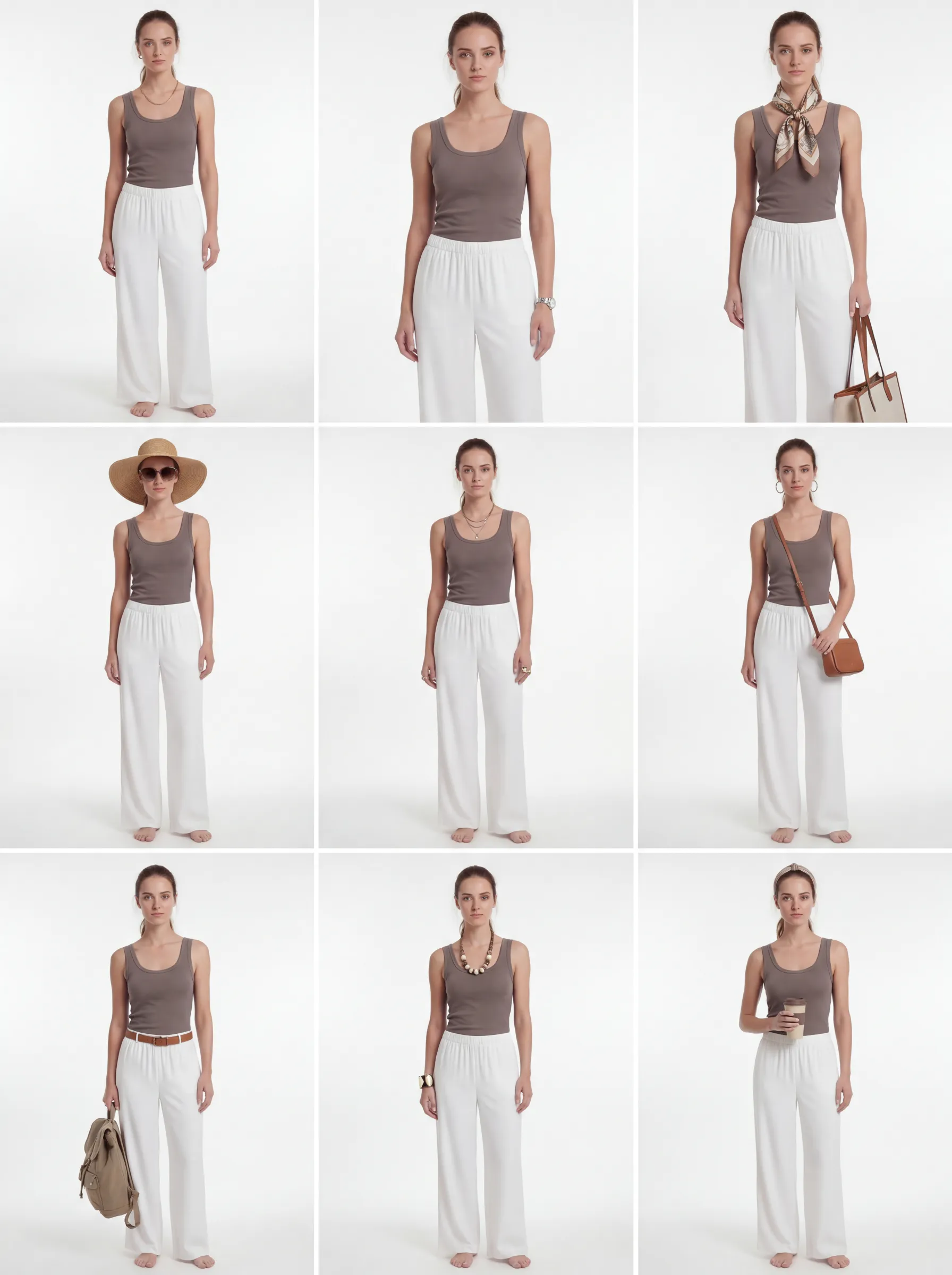
The refined grid explores styling variations. Compare each candidate with the original garments before selecting it.
3. Delivered
Image generated with AI.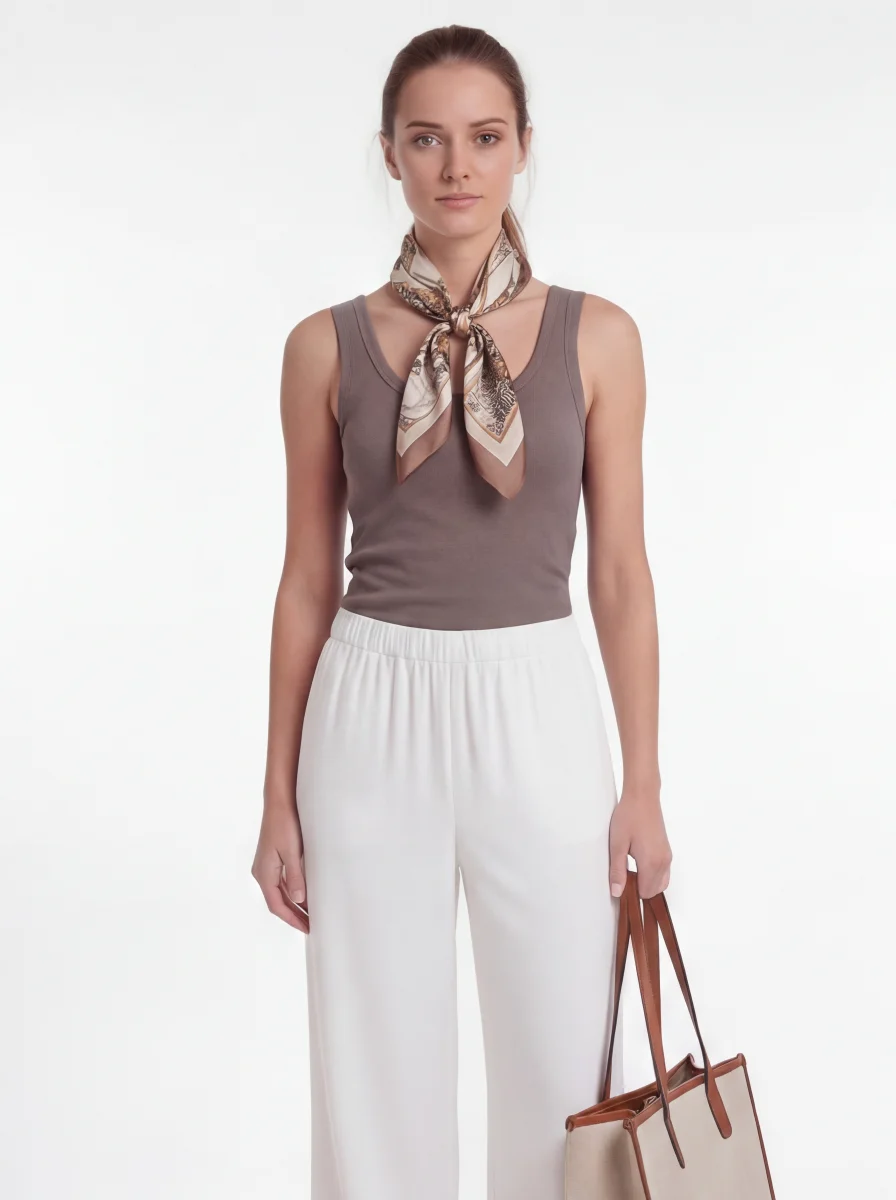
This selected result includes a scarf and bag added during styling. They are not part of the two source products. Check garment details before publishing.
See the first grid and what needed review
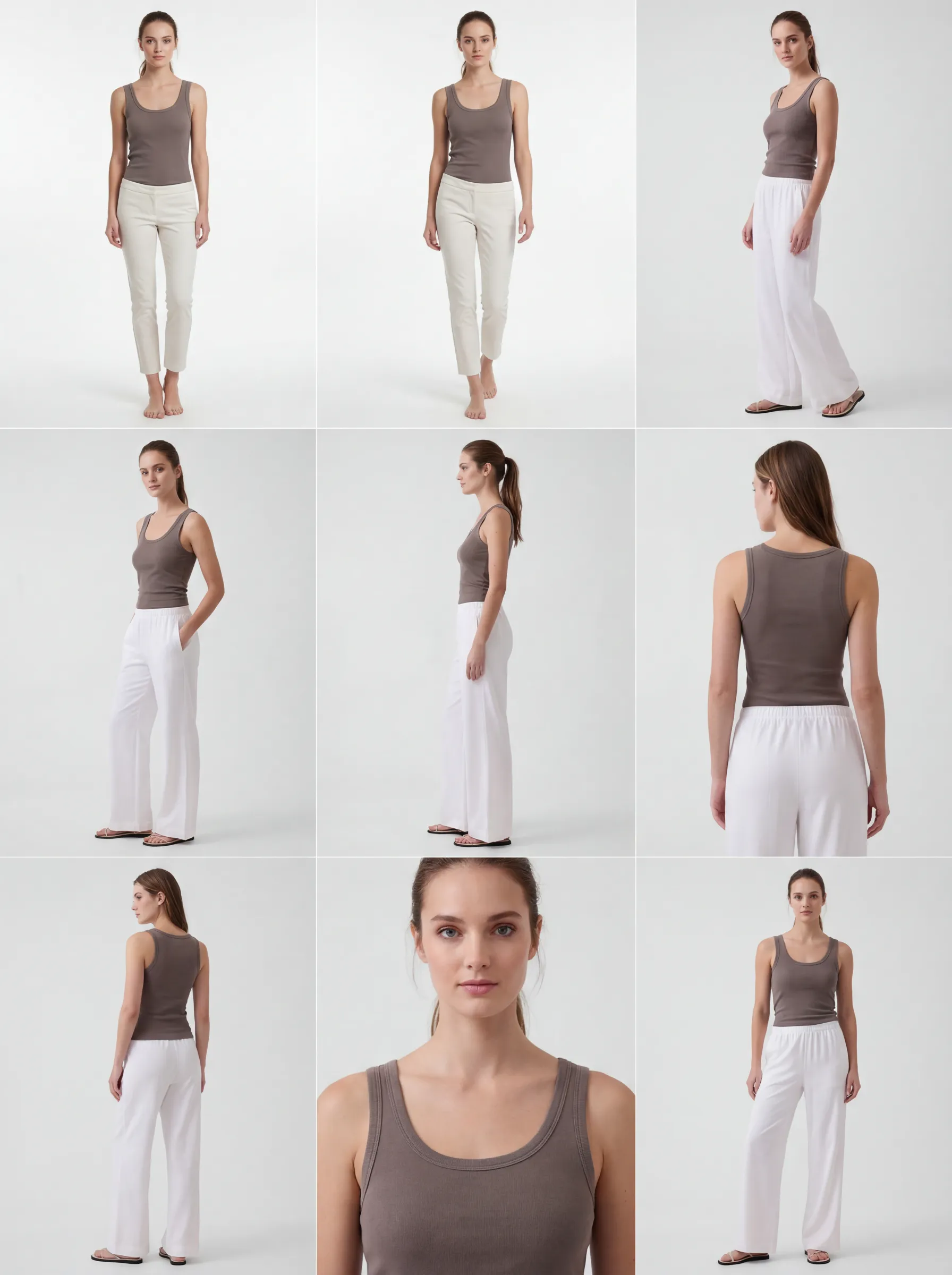 Image generated with AI.
The first two candidates show narrower, shorter trousers than the source photo. This is why selecting and reviewing images is part of the workflow. The refined grid above shows the subsequent styling variations.
Ready to try it yourself?
Start with your own garment photos. Image generation is charged to your GridShot balance.
Create an account