AI Lookbook Generator: From Product Photos to PDF
Create a fashion lookbook from your product photos
Use an AI lookbook generator to create model images from your own garments, then select and arrange the images for your collection. In GridShot, you can generate pose grids, refine individual shots and use the PDF lookbook export to put the selected images in order with a title, subtitle and brand name.
Watch the product-photo-to-model demo · Download the free lookbook shot list (CSV) · See an actual product-to-model example
- Plan the looks: Fill in the shot list with garments, framing and the destination for each image.
- Start with one outfit: Use clear garment photos and choose the model, pose grid and setting.
- Review before expanding: Compare cut, length, fabric detail and accessories with the originals. Refine the selected shots before producing the next look.
- Build the PDF: In the shots view, choose PDF, select the images, drag them into order and add the lookbook title and brand name. Check the exported document before sharing it.
The CSV template and public demo are free to access. Image generation uses your GridShot balance; see current pricing. Production time depends on the input photos, the number of attempts and the review work.
What Is a Fashion Lookbook and Why Does It Matter?
A lookbook is a curated collection of photographs that showcases a fashion brand's collection in a visually compelling way. Unlike a product catalog, which prioritizes information and clarity, a lookbook tells a story. It communicates the brand's aesthetic, the collection's mood, and how pieces work together as outfits.
Lookbooks serve multiple business purposes: they provide content for your website and social media, arm your sales team with visual tools for wholesale presentations, give press and buyers a polished overview of your collection, and create a brand narrative that goes beyond individual products.
For emerging and mid-sized brands, a well-executed lookbook can be the difference between being taken seriously by retailers and being overlooked.
Planning Your Lookbook
Define the Concept
Every strong lookbook starts with a clear concept. This goes beyond simply photographing your products — it is about creating a visual world that reflects your brand identity and the specific collection.
- Mood and theme: What feeling should the lookbook evoke? Urban sophistication, casual warmth, minimalist elegance?
- Color palette: Identify the dominant colors of the collection and choose settings that complement them
- Story arc: Consider how the lookbook flows from first to last page — does it build in energy, transition between settings, or follow a narrative?
Create a Mood Board
A mood board aligns your creative team before the first photo is taken. Collect reference imagery, color swatches, typography examples, and layout inspiration. Tools like Pinterest boards or Figma files work well for collaborative mood boarding. The goal is to establish a shared visual language that guides every decision during production.
Build Your Shot List
A shot list prevents wasted time during production. For each look, document:
- The outfit combination (all pieces included)
- Styling notes (accessories, tucking, layering)
- Shot types needed (full-length, three-quarter, detail, movement)
- Setting or background for each shot
- Model direction (pose, expression, energy level)
A typical lookbook features 10-25 looks, with 3-5 images per look. That is 30-125 final images — plan accordingly.
The Traditional Lookbook Creation Process
Assembling Your Team
A professional lookbook shoot typically requires:
- Photographer (and potentially an assistant)
- 1-3 models (depending on collection size and diversity goals)
- Stylist to prepare each look
- Hair and makeup artist
- Location scout or studio coordinator
- Art director or creative lead
For on-location shoots, add logistics: permits, transportation, catering, and weather contingencies. The total production team for a mid-range lookbook is typically 6-10 people. For a full cost breakdown of fashion photoshoots, see our detailed guide.
The Shoot Day
A well-planned shoot day follows a tight schedule. Start with simpler looks while the team finds its rhythm, tackle complex setups mid-day when energy is highest, and save the easiest remaining shots for late afternoon. Most lookbook shoots span 1-3 days depending on the number of looks and locations.
Post-Production
After the shoot, expect 1-3 weeks of post-production: image selection, retouching, color grading, and layout design. This phase is where the lookbook's visual consistency is established — uniform color treatment, consistent skin retouching, and cohesive cropping across all images.
The Modern Approach: AI-Powered Lookbooks
AI photography platforms have introduced a fundamentally different workflow for lookbook creation. Instead of organizing a physical production, you work digitally from the start.
How It Works
- Upload your garments: Product photos (flat-lay, mannequin, or hanger shots) are all you need as input
- Select or create models: Choose from diverse AI models or create custom models that match your brand aesthetic
- Generate looks: Place garments on models with different poses, expressions, and styling
- Refine and art-direct: Adjust composition, lighting, and model direction until each image matches your vision
- Export and compile: Download final images for layout and distribution
Advantages for Lookbooks
The AI approach offers several specific advantages for lookbook creation:
- Speed: Generate and review one look first to estimate the production time for your collection
- Iteration: Explore different model-garment combinations and allow time for generation and corrections
- Consistency: Reuse model and scene choices, then check lighting, framing and garment details across the selected images
- Cost predictability: Budget for the images you publish, the operations you run and the time spent selecting and refining them
- Seasonal agility: Create lookbooks for every drop, not just major collections
Best AI Lookbook Generator Tools Compared
Several AI tools now offer lookbook generation capabilities for fashion brands. Here is how the leading options compare for creating professional lookbooks:
GridShot — From garment photos to a PDF lookbook
GridShot combines reusable AI models, outfit composition, pose grids and shot refinement. Start with your own product photos, compare the generated variations and select images that accurately represent your garments. Reusing a model helps carry a visual identity across a collection; each image still needs a check for face, proportions, fit and product details.
The shots view includes a PDF lookbook builder. Choose the images, drag them into page order, and add a title, subtitle and company name before exporting. This turns the selected shots into a document you can review and share. The public demo shows the image-generation workflow, and the example below documents one actual outfit and its visible corrections.
Useful when: Your team needs to generate styled model images, make selections and compile the selected work. For larger catalogues, see the product-photography scaling guide.
Rawshot.ai — Best for Photo + Video Lookbooks
Rawshot.ai generates both on-model photos and photorealistic fashion videos from product images. If your lookbook strategy includes video content for social media, Rawshot offers this as a single platform. The tool targets fashion brands looking for lookbook-style content across multiple formats.
Best for: Brands that need both photo and video lookbook content from one platform.
Pincel App — Best for Quick Single-Image Generation
Pincel is a general-purpose AI image generator with a lookbook mode. It produces individual images rather than grids, making it suitable for brands that need a few lookbook shots rather than full catalog coverage. The interface is straightforward and accessible for non-technical users.
Best for: Small brands or designers who need occasional AI-generated lookbook images without a dedicated workflow.
FASHN.ai — Product-to-Model Images and Virtual Try-On
FASHN.ai offers a web app and API for fashion teams, including product-to-model images, virtual try-on, model creation and model swaps. For a lookbook, compare its output with your original garments and check the steps needed to assemble the final document.
Consider when: Your team needs a fashion image app or wants to integrate generation through an API. See our comparison checklist for AI fashion photography tools.
How to Choose an AI Lookbook Generator
The right tool depends on your lookbook requirements:
- Full collection lookbooks (20+ looks): GridShot — persistent models, grid generation, and outfit building are designed for this scale
- Photo + video content: Check the current photo and video options from Rawshot.ai against your required formats
- Occasional single images: Pincel — quick and accessible for one-off needs
- Fit-critical garments: GridShot supports fit references while you create pose grids. Compare garment length and drape against the original before approving a result
- Existing photos to improve: Claid.ai or Photoroom — enhance rather than generate from scratch
Key Elements of an Effective Lookbook
Model Selection
Your model choice significantly impacts how the collection is perceived. Consider diversity in body type, ethnicity, and age to reflect your customer base. Consistency is also important — using 1-3 models throughout creates visual cohesion, while too many different faces can fragment the narrative.
Styling and Outfit Composition
Each look should demonstrate how pieces work together. Include complete outfits (not just individual garments), show versatility by re-styling key pieces across multiple looks, and layer accessibly — your customer should be able to imagine wearing each outfit.
Photography Style
Choose a consistent photography approach:
- Studio: Clean backgrounds, focused on the garments. Professional and commercial.
- Lifestyle: Real-world settings that contextualize the clothes. Aspirational and relatable.
- Editorial: Artistic, fashion-forward compositions. Bold and brand-building.
Most successful lookbooks stick to one primary style with minor variations rather than mixing dramatically different approaches.
Layout and Sequencing
The order of looks matters. Open with a strong, attention-grabbing image. Group looks by theme, occasion, or color story. Alternate between full-page hero shots and multi-image spreads. Close with a memorable final look that reinforces the brand message.
Distribution Strategies
Website Integration
Your lookbook should live prominently on your website. Options include a dedicated lookbook page, an interactive gallery with shoppable links to individual products, or a full-screen immersive experience. Ensure each look links to the featured products so customers can purchase directly.
Digital PDF
PDF lookbooks are essential for B2B — wholesale buyers, press, and retail partners expect a downloadable format. Keep the file size reasonable (under 20MB) while maintaining image quality. Include product names and reference numbers for easy ordering.
Social Media
Adapt your lookbook content for each platform:
- Instagram: Individual looks as posts, behind-the-scenes as Stories, full collection as a carousel
- Pinterest: Vertical images with outfit detail, link to shoppable pages
- TikTok: Quick lookbook reveal videos, transition compilations
Tips for Different Brand Sizes
Emerging Brands (under 50 SKUs)
Focus on quality over quantity. A lookbook with 8-12 strong looks tells a more compelling story than 25 mediocre ones. Consider AI tools to test concepts before investing in physical production. Your lookbook is your brand statement — make every image count.
Growing Brands (50-500 SKUs)
This is where the hybrid approach shines. Invest in a professional shoot for your hero campaign imagery, and supplement with AI-generated looks for broader catalog coverage. Create separate mini-lookbooks for different product categories or occasions.
Established Brands (500+ SKUs)
At scale, you likely need multiple lookbooks per season — main collection, pre-season, collabs, and category-specific books. Use AI to produce category lookbooks and seasonal previews quickly, reserving traditional production for flagship campaign pieces.
Common Mistakes to Avoid
- No clear concept: Random product shots do not constitute a lookbook. Start with a story.
- Inconsistent styling: Mixing wildly different photography styles within one lookbook is disorienting.
- Ignoring your customer: A lookbook should reflect how your actual customer would wear the clothes, not just how they look on a runway.
- No distribution plan: The best lookbook is useless if nobody sees it. Plan distribution before production.
- Treating it as a one-time effort: Lookbooks should be seasonal and iterative. Each one builds on lessons from the last.
Questions about creating an AI lookbook
Which AI lookbook generator should I choose?
Choose by your workflow: generating garment images, keeping a model across looks, correcting details and assembling the final document. Test the same outfit in the tools you are considering. GridShot supports pose grids, reusable models, image refinement and PDF lookbook export.
How long does it take to create a fashion lookbook with AI?
There is no fixed completion time for a collection. Start with one outfit and measure the time for generation, retries, selection, corrections and PDF review. Use that pilot to estimate the remaining looks.
Can I use the same AI model across my entire lookbook?
You can reuse a saved model in GridShot. Compare the selected images for identity, proportions and styling; reusing a model does not replace a visual consistency check.
Can I export the lookbook as a PDF?
Yes. In the shots view, open PDF, select images, arrange their order and add a title, subtitle and company name. Generate the PDF, then review the downloaded document before sharing it.
Is the lookbook generator free?
The shot-list template and public video demo are free to access. Image generation is charged against your GridShot balance. Check current pricing and account credit before starting; include additional attempts and refinement in your budget.
From flat-lay to finished shot
One example from GridShot: two flat-lay product photos, reviewed variations, and a delivered model image.
1. Input
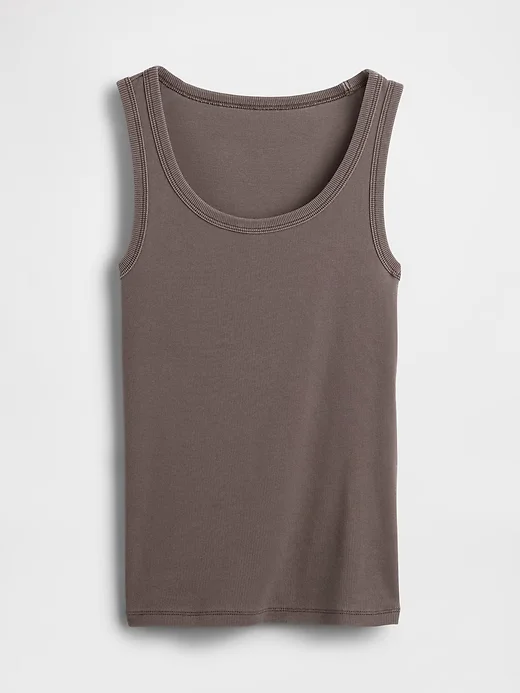
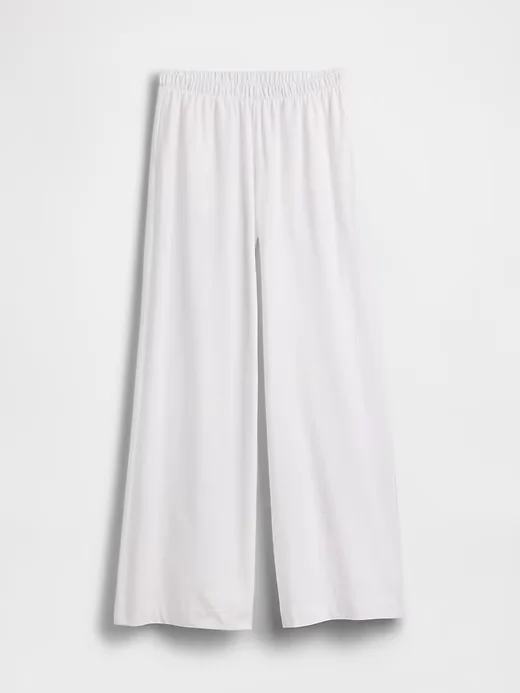
Upload the top and trousers as separate product photos, then choose a model.
2. Review and refine
Image generated with AI.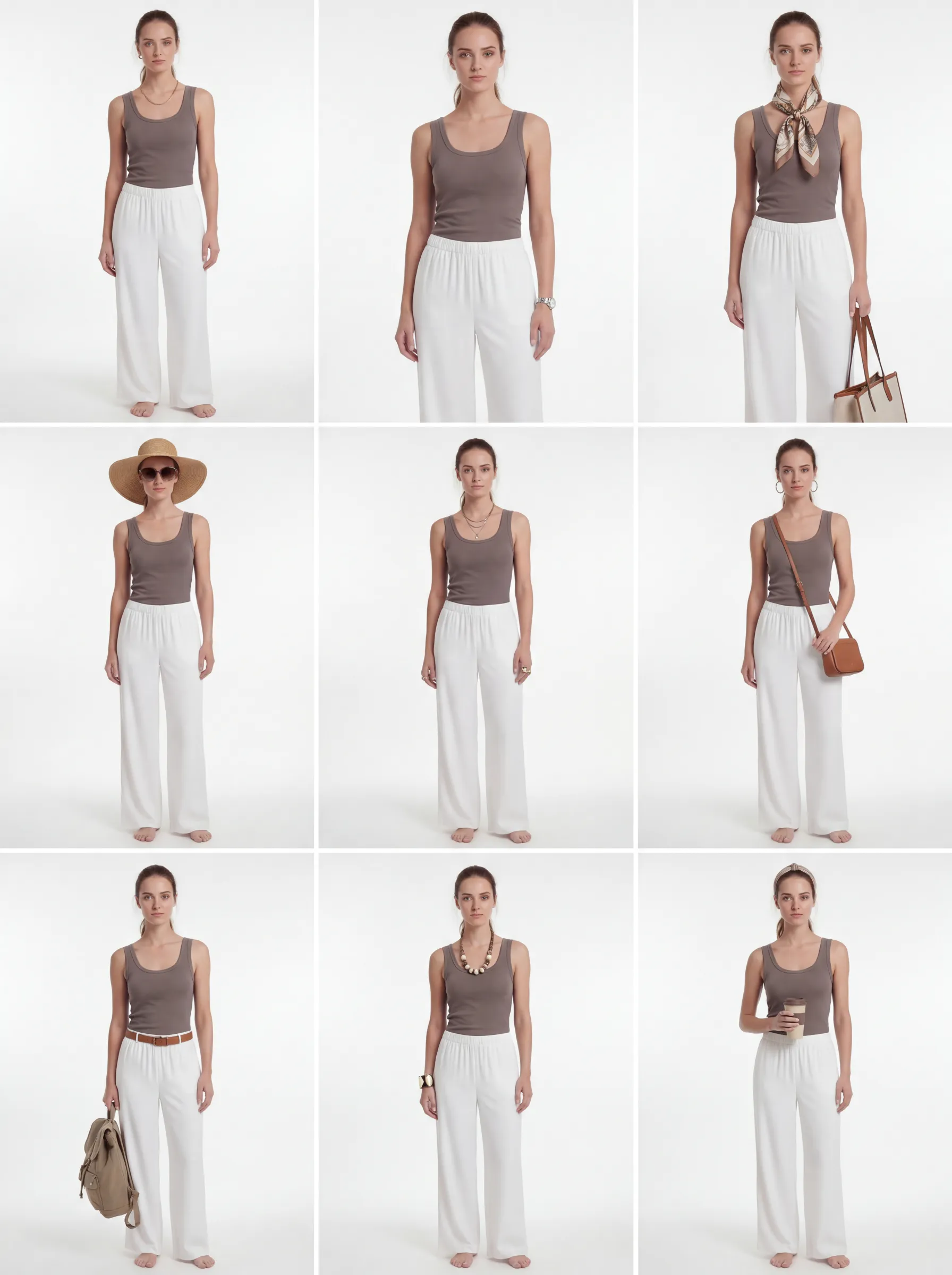
The refined grid explores styling variations. Compare each candidate with the original garments before selecting it.
3. Delivered
Image generated with AI.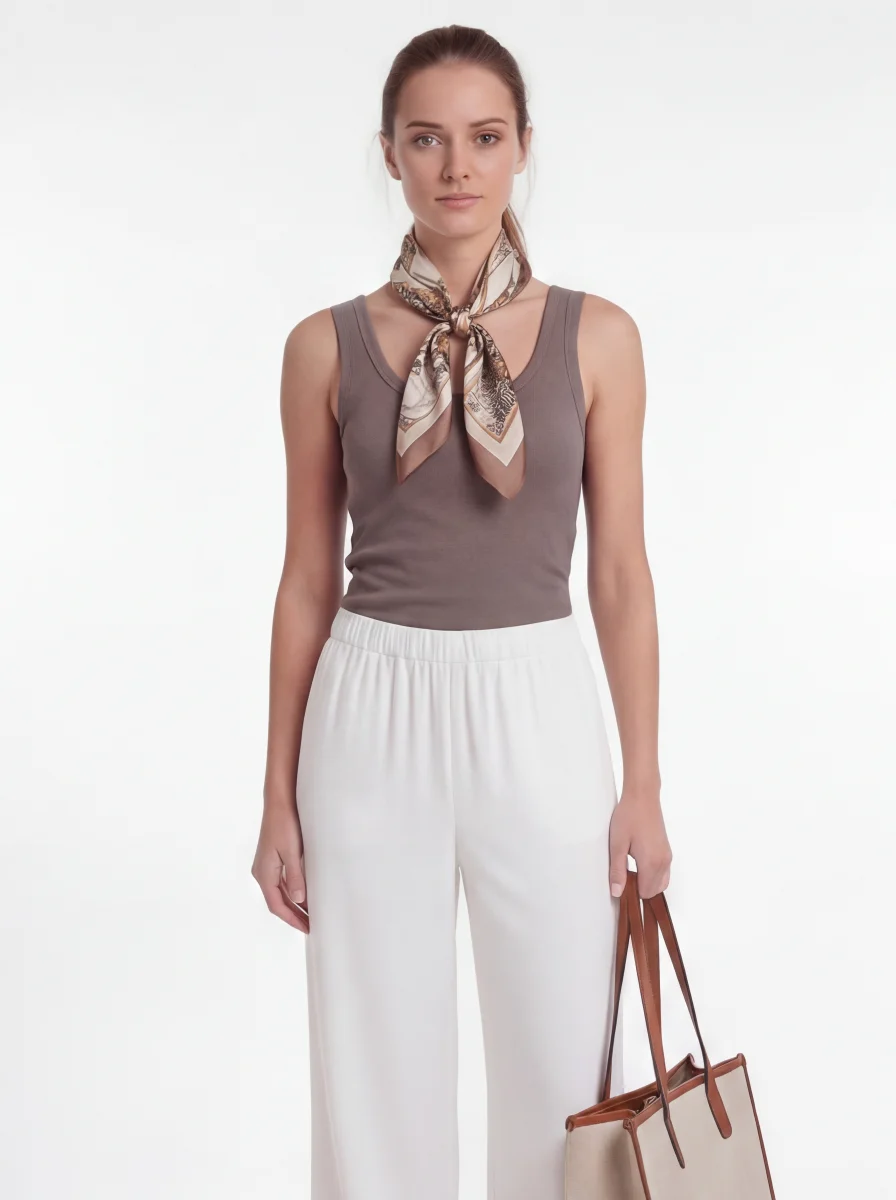
This selected result includes a scarf and bag added during styling. They are not part of the two source products. Check garment details before publishing.
See the first grid and what needed review
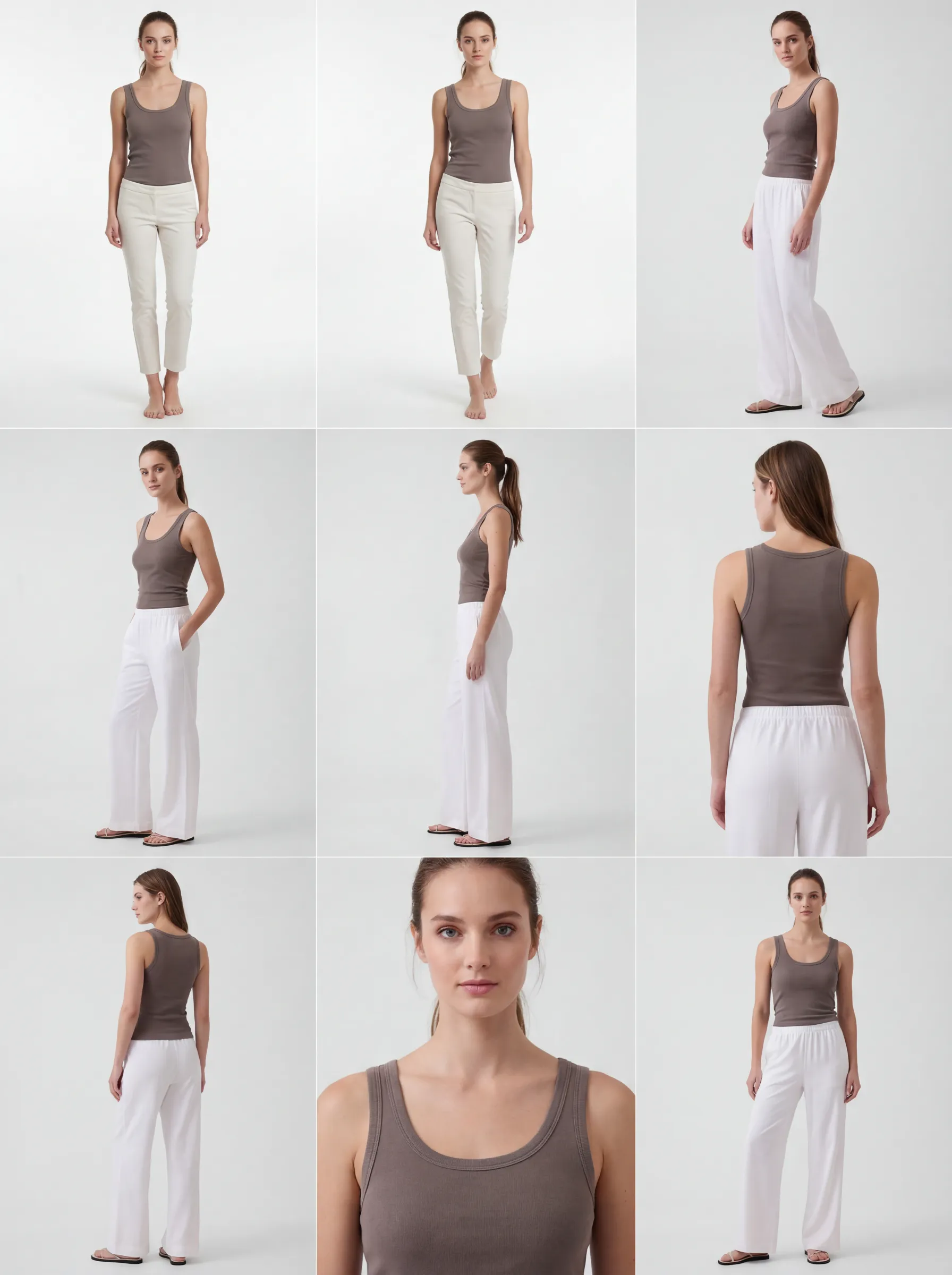 Image generated with AI.
The first two candidates show narrower, shorter trousers than the source photo. This is why selecting and reviewing images is part of the workflow. The refined grid above shows the subsequent styling variations.
Ready to try it yourself?
Start with your own garment photos. Image generation is charged to your GridShot balance.
Create an account